Colors are an important part of our daily lives. The way we represent colors in digital or print forms, as well as how we perceive them physically, is vital for design, technology, and everyday experiences. You might recognize terms like RGB, HEX, or CMYK when talking about colors. But have you heard of CIE Lab or YIQ? In this article, we will look at each of these color models. We’ll explain how they help us understand colors and what purposes they serve.
RGB
One of the most well-known color models is RGB, which stands for Red, Green, and Blue – the primary colors of light. This is an additive model, meaning we start with black (the absence of light) and create all the colors of the spectrum by adding different amounts of red, green, and blue light.
RGB colors are represented by three numbers, each ranging from 0 to 255:
- (0, 0, 0) represents black
- (255, 255, 255) is white
- (255, 0, 0) is red
To create pink color from red, we need to add a little bit of white light. In this case, we’ll add just a touch of green and blue, since we've already used all the red, resulting in:
- (255, 220, 220), which represents pink.
You may also come across RGB Decimal and RGB Percent notations. While we already discussed RGB Decimal, RGB Percent represents the same colors as percentages corresponding to the values from 0 to 255. In this notation, red is represented as (100%, 0%, 0%), while a shade of pink would be shown as (100%, 86.27%, 86.27%).
The RGB color model is used for digital color representation in computer monitors, televisions, and digital cameras. For instance, when designing a website, you can specify the colors of buttons or text using RGB.
HSV
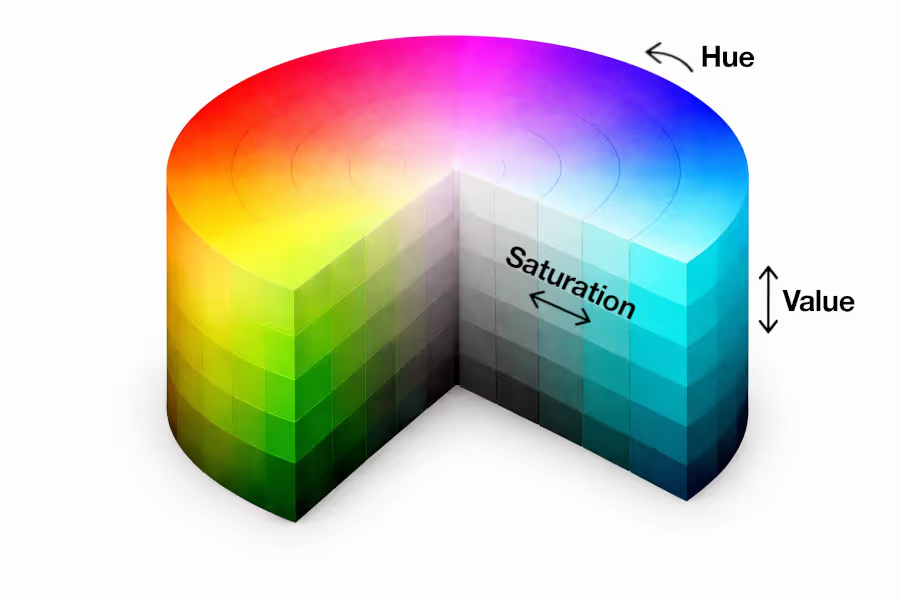
HSV stands for Hue, Saturation, and Value. Unlike RGB, which describes color in terms of light components, HSV is designed to be more intuitive — it describes color the way humans naturally think about it.
Hue defines the color itself and is represented as an angle from 0° to 360° on a color wheel. For example, 0° is red, 120° is green, and 240° is blue.
Saturation controls how vivid or washed-out the color appears, ranging from 0% (completely gray) to 100% (pure, vibrant color).
Value controls the brightness of the color, from 0% (black) to 100% (the full brightness of the chosen color).
For example, a deep forest green might be represented as (135°, 70%, 50%), while a bright lime green would be something like (90°, 80%, 90%).
HSV is widely used in design tools and color pickers because it's easy to adjust a color's tone or brightness without having to change three separate RGB numbers. You'll find it in software like Photoshop or Figma, where designers can simply "turn up the saturation" to make a color pop.
HSL
HSL (Hue, Saturation, and Lightness) is very similar to HSV, but it handles brightness differently. Both models share the same Hue and Saturation components, but Lightness works along a different scale.
In HSL, Lightness ranges from 0% to 100%, where:
0% is always black
50% gives you the pure, true color
100% is always white
This makes HSL a bit more symmetrical: you can think of it as placing the pure color in the middle, with black on one end and white on the other.
For comparison, that same forest green from our HSV example would be represented differently in HSL. The hue stays the same, but the lightness and saturation values shift to reflect this new scale.
HSL is especially popular in web design. CSS, the language used to style websites, supports HSL natively, making it easy for developers to create color palettes by simply adjusting lightness values to get darker or lighter shades of the same hue.
YIQ
YIQ is a color model that was developed for the NTSC television system – the broadcast standard used in North America for decades. Its design is rooted in a clever practical problem: how do you broadcast color TV while keeping it compatible with older black-and-white televisions?
The model separates color information into three components:
Y represents luminance – the brightness of the image. A black-and-white TV only reads this channel, which is why old TVs could still display a proper grayscale image from a color broadcast.
I and Q carry the color (chrominance) information, encoding hues along orange-blue and purple-green axes respectively.
While YIQ is rarely used directly in modern design, it remains relevant in image processing and video compression. The principle behind it — separating brightness from color – is also the foundation of several other color models still used today.
CMYK
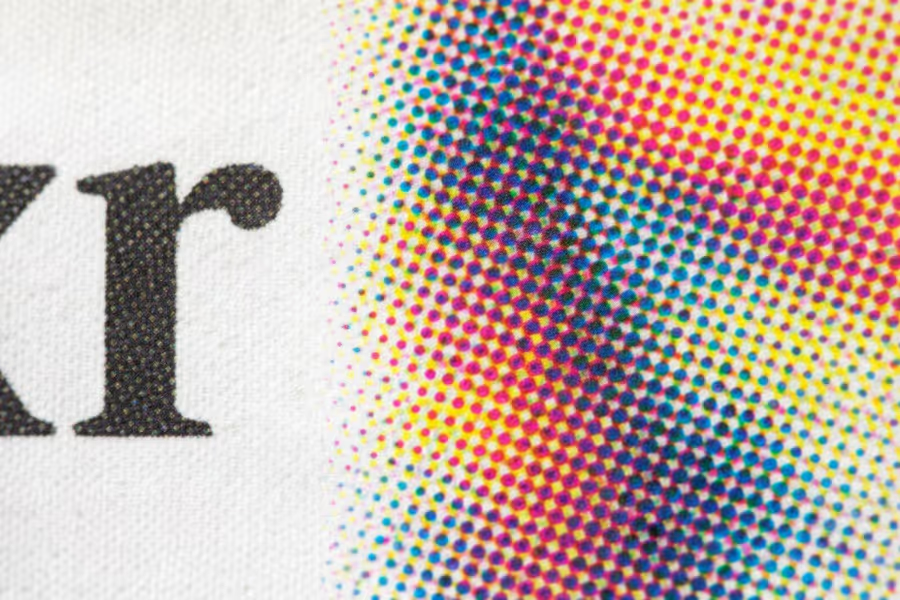
While RGB is built around light, CMYK is built around ink. It stands for Cyan, Magenta, Yellow, and Key (Black), and it works as a subtractive color model – meaning colors are created by absorbing (subtracting) light rather than emitting it.
When you mix cyan, magenta, and yellow inks, they absorb different wavelengths of light. In theory, mixing all three at full strength should produce black – but in practice, it creates a muddy dark brown. That's why black ink (K) is added as a separate component. The letter K is used for "Key" to avoid confusion with Blue in RGB.
Each component in CMYK is expressed as a percentage from 0% to 100%:
(0%, 0%, 0%, 0%) is white (no ink on the paper)
(0%, 0%, 0%, 100%) is pure black
(0%, 100%, 100%, 0%) is red
CMYK is the standard color model for professional printing – brochures, business cards, packaging, and magazines are all designed in CMYK. If you've ever noticed that a color looked different on screen versus in print, it's often because the screen uses RGB while the printer uses CMYK, and the two models don't cover exactly the same range of colors.
XYZ
XYZ (also written as CIE XYZ) is a foundational color model created by the International Commission on Illumination (CIE) in 1931. Its goal was ambitious: to mathematically describe every color the human eye can perceive, regardless of the device displaying it.
The three components (X, Y, and Z) don't correspond to physical colors you can visualize the way red or blue do. Instead, they represent abstract measurements derived from scientific studies of human vision:
Y corresponds roughly to perceived brightness (luminance)
X and Z capture color information along axes that map to how the eye's cone cells respond to light
XYZ values are always positive and have no fixed upper limit – they depend on the reference white point being used.
You'll rarely encounter XYZ directly in everyday design work, but it plays an enormous role behind the scenes. It serves as the universal "bridge" between all other color models – when software converts a color from RGB to CMYK, or from one screen profile to another, it almost always passes through XYZ along the way.
CIE Lab
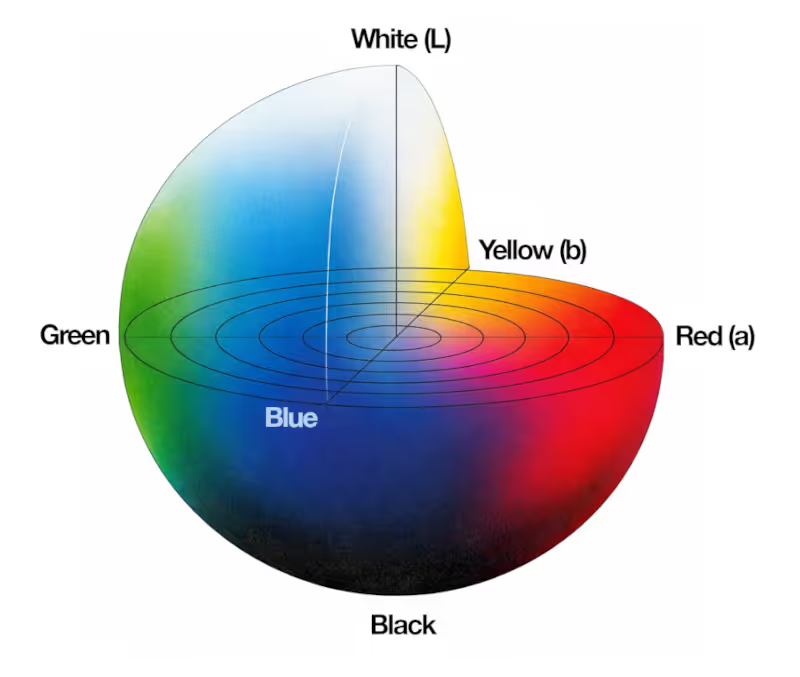
CIE Lab (often written as L*a*b* or just Lab) was built on top of XYZ with one key goal: to make color differences feel consistent and predictable to the human eye.
The model has three components:
L* represents Lightness, from 0 (black) to 100 (white)
a* represents the green–red axis: negative values shift toward green, positive toward red
What makes Lab special is that it's perceptually uniform – a numerical difference of, say, 5 units looks like roughly the same visual change no matter where you are in the color space. This is something RGB and CMYK can't guarantee.
Lab is heavily used in color-sensitive industries like paint manufacturing, textile dyeing, and product packaging, where it's critical to measure and communicate color differences precisely. It's also used in photo editing for fine color corrections, since adjusting lightness in Lab doesn't affect hue or saturation the way it might in RGB. For interior paint, Lab is particularly valuable — it helps manufacturers ensure that the color you see on a chip matches what ends up on your wall.
CIE Luv
CIE Luv (written as L*u*v*) is a close cousin of CIE Lab. Both were developed by the CIE around the same time, and both aim to be perceptually uniform. The key difference lies in how they handle chromaticity – the mathematical relationship between the color axes.
Like Lab, Luv uses:
L* for Lightness (same scale: 0 to 100)
u* and v* for chromaticity, but calculated using a different formula than Lab's a* and b*
In practice, Luv tends to be better at representing additive color mixing (like light on a screen), while Lab has become the more widely adopted standard for industries dealing with physical materials. You're more likely to encounter Luv in academic research, display technology, and color science literature than in everyday design tools.
Decimal
The Decimal color notation is a way of representing a color as a single whole number, rather than three separate values. It's directly derived from the familiar HEX color code.
A HEX color like #FF5733 is a base-16 (hexadecimal) number. Converting it to base-10 gives you a single decimal integer, in this case, 16,734,003. That single number uniquely identifies the same color.
Decimal notation isn't commonly used in design software or CSS, but it appears in certain programming contexts – for example, in some APIs, databases, or older software systems where colors are stored or transmitted as a single integer rather than as separate R, G, B components. It's simply another way of encoding the same information.
Hunter Lab
Hunter Lab is an older color model that predates CIE Lab, developed by Richard S. Hunter in the 1940s. Like CIE Lab, it uses three components to describe color in a way that's closer to human perception:
L represents Lightness (0 to 100)
a represents the green-red axis
b represents the blue-yellow axis
The structure looks identical to CIE Lab, but the two models use different mathematical formulas to calculate their values from XYZ data – so the same color will produce different numbers in each model.
Hunter Lab was widely used in industries like food, coatings, and plastics for quality control, and many older measuring instruments were calibrated to it. Today, CIE Lab has largely replaced it as the industry standard, but Hunter Lab is still supported in professional color measurement equipment and software, particularly when working with legacy data or systems.